Follow the story
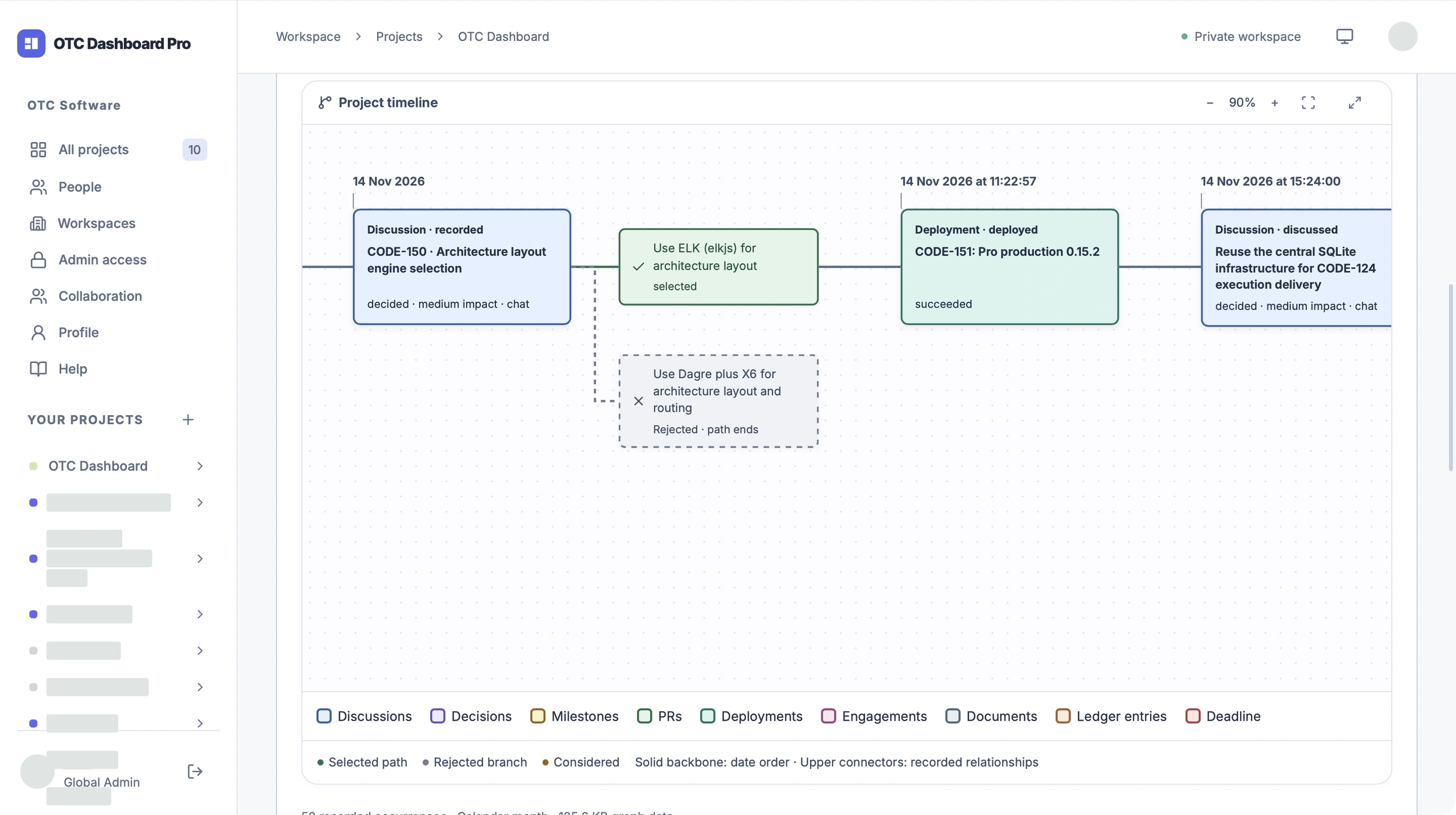
Decisions, milestones and releases meet on one connected timeline.
A LITTLE ORDER FOR YOUR AI-BUILT PROJECTS
Keep your projects, tasks and decisions together—so you and your coding assistant can pick up where you left off.
See what needs doing. Remember why. Understand how it all fits together.
Free Standalone software · Your choice of assistant
Apple Silicon · macOS 13+ · Signed & notarized
THE BIG PICTURE, IN MOTION
Our own project. Real work, real history, one connected picture.
OTC Dashboard — connected by design, v5 tight cut
This is OTC Dashboard. Inside OTC Dashboard.
Every decision leaves a trail. Work, milestones and releases connect on one timeline.
Move into Solution. See the pieces of the product—and the relationships that make them a system.
Then Infrastructure. A different view of the same system, from the application to the services around it.
On your Mac. On your server. Or together in Pro.
Next: orchestration, task sync, incident tracking and DORA. Coming soon.
OTC Dashboard. Build with AI. Keep the whole story.
THE USEFUL PARTS, TOGETHER
Decisions, milestones and releases meet on one connected timeline.
Solution explains how it works. Infrastructure shows where it runs.
Keep tasks, priorities and blockers close to the work.
Connect Codex, Claude Code, Cursor or Antigravity through native MCP.
Project mappings and saved context live in one central place.
Review recorded tokens and approximate AI costs alongside the work.
FROM THE STORY TO THE SYSTEM
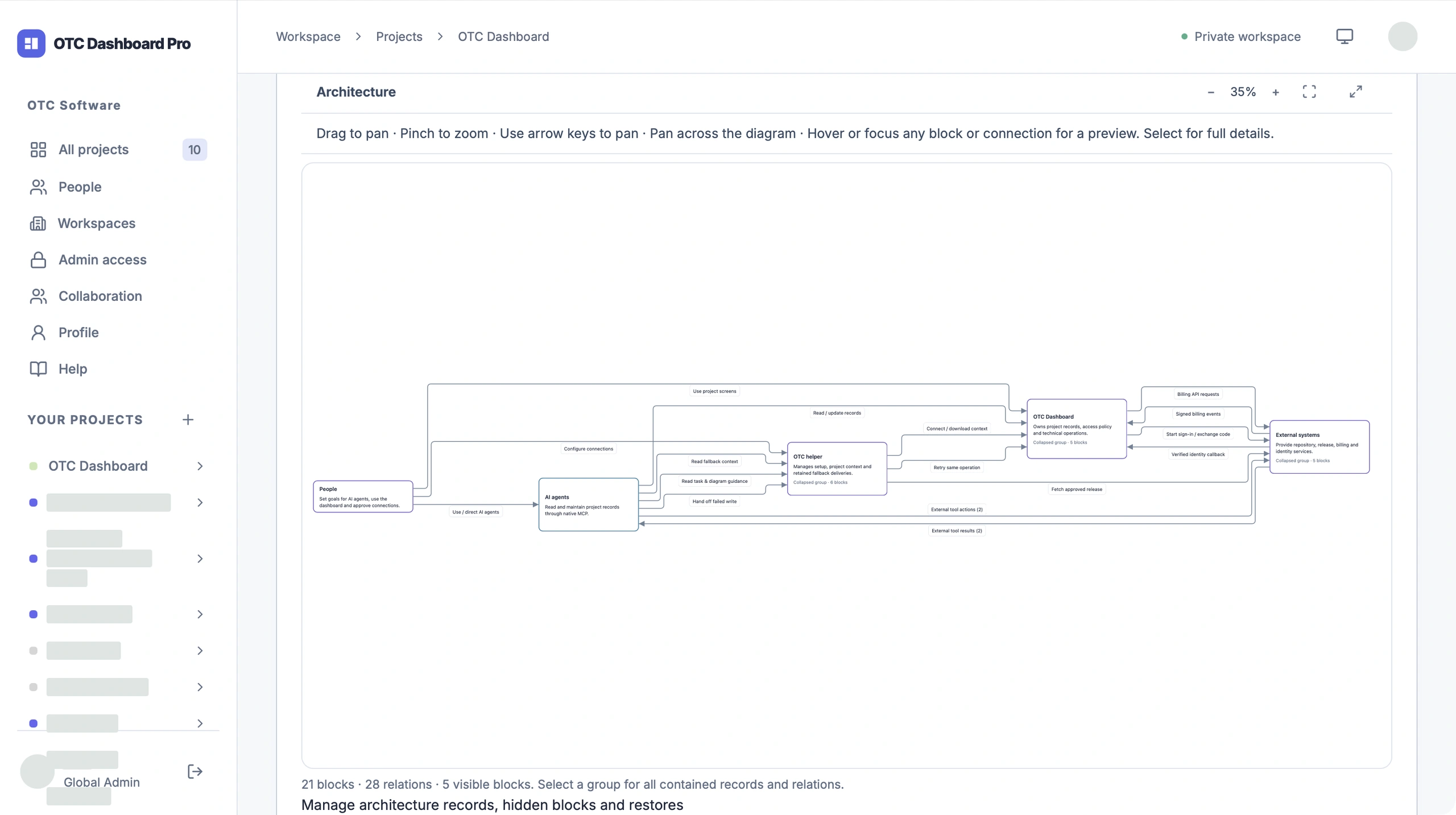
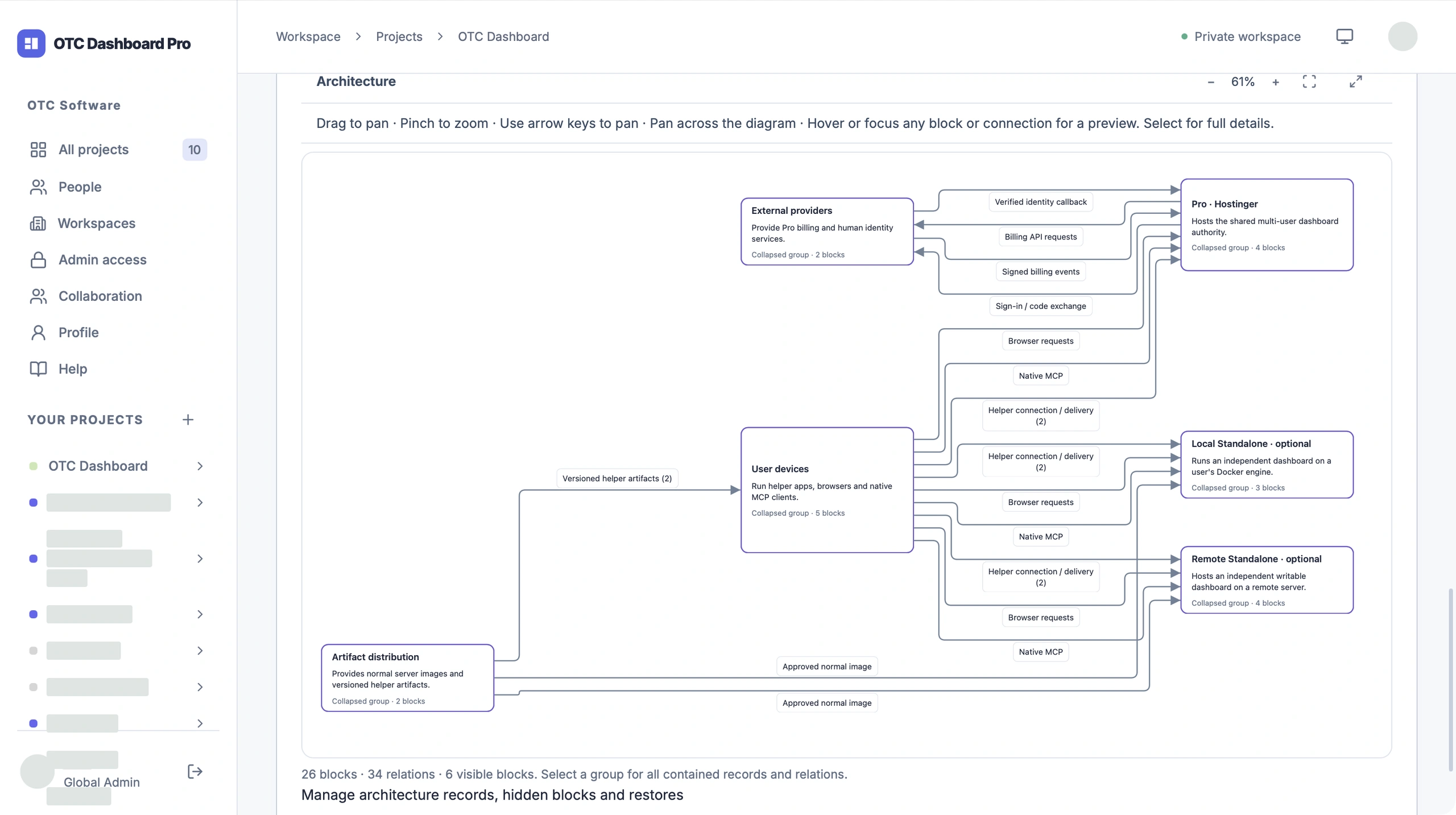
Two views of the same project. Clear responsibilities, real connections.
The components and the flow between them.
The hosting, runtimes and services behind the product.
A FEW STEPS TO A CLEARER PICTURE
01
Run Standalone on your Mac, use your own Remote server, or choose OTC-hosted Pro.
02
Pick your coding client and approve its native connection.
03
Link your project folders. Open a fresh chat and start with a task.
The helper guides you through Account → Connections → Agents → Projects → Review. See Help ↗
YOUR WORK. YOUR CHOICE OF HOME.
LOCAL STANDALONE
Your dashboard and database, running locally.
Free software · Local Docker runtime
REMOTE STANDALONE
An independent, writable dashboard on your own server.
Free software · Your hosting
OTC-HOSTED PRO
Authorized contributors, assignment and Admin controls.
Hosted by OTC · Project plans
Native agents access permitted technical records in every edition. Business, People, billing, access administration and secret values stay outside that native scope.
OTC-HOSTED PRO
Bring people and coding assistants into the same project, with assignment, preserved attribution and access that follows their roles.
ROOM TO BUILD, WITHOUT THE SEAT COUNT
Choose the setup you need,
without paying for every person who joins.
LOCAL STANDALONE
$0 forever
Free software, on your own Mac.
REMOTE STANDALONE
$0 forever
Free software. Your hosting.
You cover hosting and upkeep.
View setup helpOTC-HOSTED PRO
$10 USD / project / month
Billed monthly. Or $100/project/year, billed annually.
No per-seat charge. Applicable taxes calculated at checkout.
Explore ProThe price grows with the number of projects. Admins and Contributors have no seat limit.
| Project capacity | Billed monthly | Billed annually |
|---|---|---|
| 1 project | $10/month | $100/year |
| 3 projects | $30/month | $300/year |
| 5 projects | $50/month | $500/year |
NEXT UP
Planned features, not available yet.

A GOOD PLACE TO START
One helper for your dashboard, coding assistants and project folders.
Download for Apple SiliconDeveloper ID signed, Apple notarized and stapled.
FROM DOWNLOAD TO CONNECTED PROJECT
Download the Apple Silicon installer.
Open OTC Dashboard on your Mac.
Choose your dashboard, assistant and project.
Docker is needed to run Standalone locally. An existing Remote or Pro connection needs no local dashboard or database. Internet access is needed for setup and live connections.

A PROJECT BY VLAD AT OTC SOFT
OTC Dashboard is brought to you by an agentic coding enthusiast who wanted a clearer way to keep track of the work around the code.
When you build with AI, ideas move quickly. The reasons behind them should not disappear into old chats. OTC is a practical place to keep the tasks, choices and history worth carrying forward.
Built from the everyday habit of making things—and wanting to understand them later.
Local and Remote Standalone software are free. You cover your own hardware and hosting. Pro adds OTC hosting and shared project plans.
Codex, Claude Code, Cursor and Antigravity, each with its own native sign-in and approval.
Remote and Pro dashboards work in a browser, including on your phone. The Mac helper requires Apple Silicon and macOS 13 or later.
Permitted technical records. Business, People, billing, access administration and secret values stay outside the native agent scope.
Read-only Markdown snapshots keep the last available project context nearby. Check their freshness before relying on them.
FOR THE THINGS WORTH CARRYING FORWARD
A clearer picture of the work. More room to build.